The Complete Enterprise Project Management Solution
Copyright 2000-2021, Innovative Tool Solutions
|
Project Engine
Project Engine is a complete enterprise project management and task tracking system that can be used for a wide range of projects. It is designed for anyone involved in the project including management, customers and the project team.
Project Engine is the only solution that truly integrates tasks, issues and any other activities in your process into one powerful but easy-to-use system.
Increase Productivity
Project Engine will dramatically increase the productivity in your project by supporting all project members in all stages of the project life-cycle. Project Engine can be used for project planning and tracking work down to the smallest activity.
Not found a sufficient tool for your project yet?
You are not alone, many project tools are complicated, requires too much work or does not work in practice. Fear not, Project Engine will take care of most of the common problems found in projects today.
 Read more... Read more...
|
Work from Anywhere
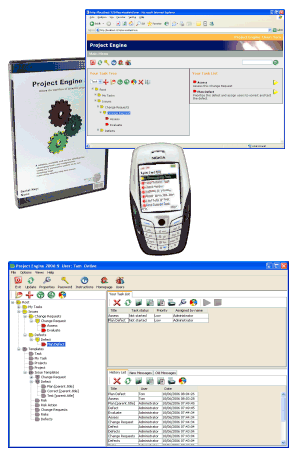
Access your tasks from any place. Project Engine has a full range of clients to be able to work with your tasks from any location.
Work from
Your office using the Project Engine client. The client application supports the widest range of functionality and may also be used for managing users and creating project templates.
Any computer using the Project Engine web interface. The web interface can be used for most task operations. It is designed to be extremely user friendly and it is targeted for beginners to normal users.
Anywhere using the Project Engine mobile client. Use your cell phone to view, start and complete tasks. Like the web interface, the mobile client is designed to be very easy to use.
|
|
|
A reliable, scalable and secure solution for:
managing tasks and assignments
handling personal or public to-do lists
project planning and tracking
workflow/process management
scheduling events
managing requirements and risks
tracking defects and change requests
executing step-by-step test cases
instant messaging
supporting ITIL processes
version control with traceability to tasks
|
Read more...
|
|
|
|